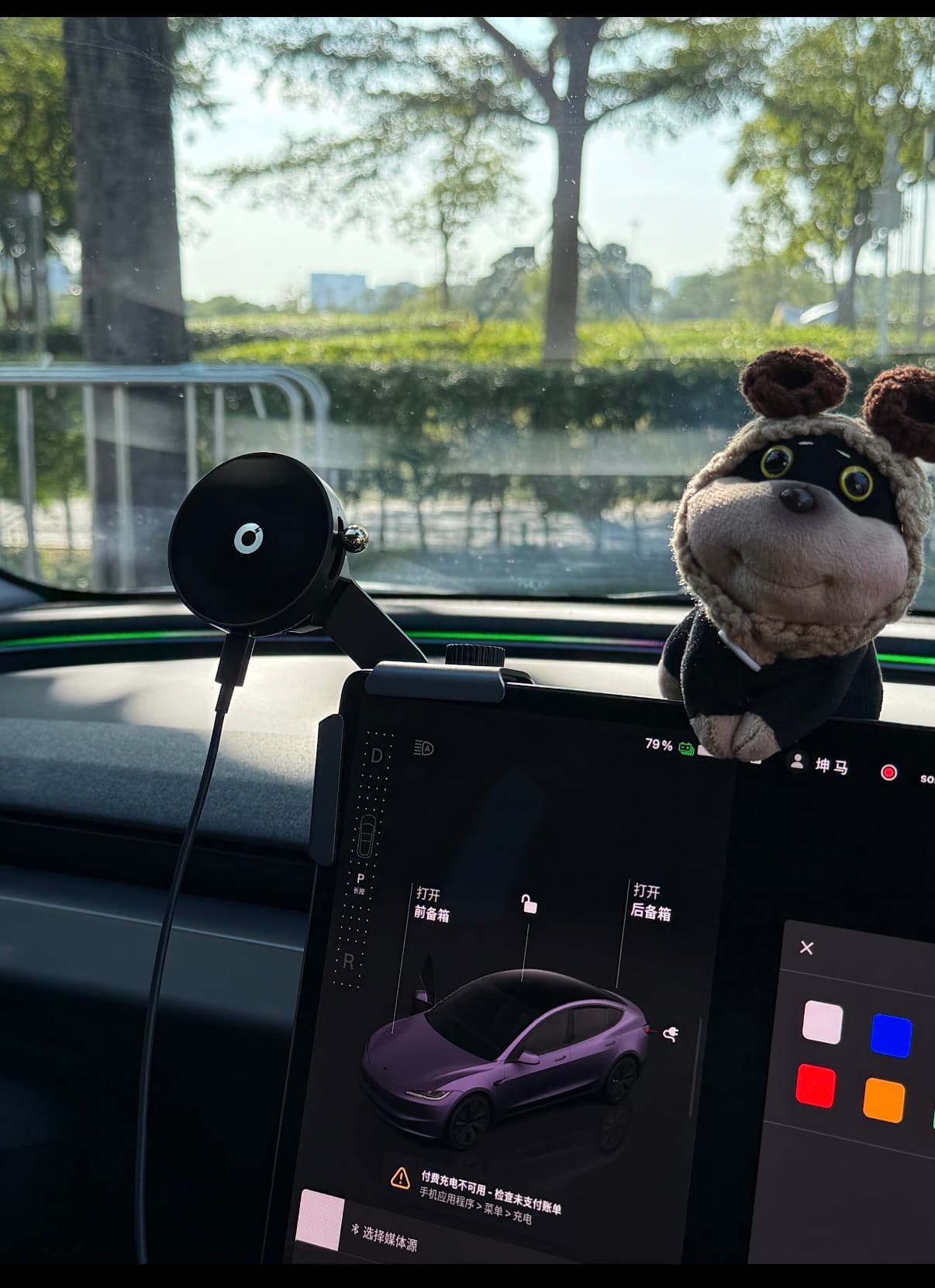
The best Model Y phone mount holds the device securely in a lawful position without blocking the road, touchscreen, vents, airbags, cameras, or controls. Buy one only for a defined need, then prioritize stability and removal over clever movement.
Decide Whether You Need a Mount
Model Y already integrates navigation, calls, audio, phone-key functions, and charging. Many owners can leave the phone on the charging area or stored away.
A mount may still help with:
- A lawful work or accessibility requirement
- A passenger-managed device
- A specific app not available through the vehicle
- A consistent place for a phone that does not charge well on the pad
- Stationary use while parked
The mount should not create a new reason to touch the phone while driving. Check local laws for windshield, dashboard, and driver-view placement.
Common Mount Types
Screen-edge mounts
These attach near the central display and keep the phone close to the car's existing visual focal area. The disadvantages are possible screen-edge pressure, vibration, blocked display content, cable clutter, and extra weight on the mounting point.
Check whether the bracket is designed for the exact screen thickness and rear housing. It must not press buttons, cover the display, or interfere with screen movement on any vehicle equipped with an adjustable mechanism.
Dashboard or trim-mounted arms
A short arm can place the phone near the screen without attaching to it. Adhesive or friction attachment must be compatible with the surface. Cabin heat can weaken some adhesives, while aggressive adhesive can mark trim during removal.
A longer arm increases leverage and may vibrate more. Compact and rigid usually matters more than a wide adjustment range.
Vent mounts
Vent mounts are easy to install in many cars, but Model Y vent design is not the same as a conventional slatted vent. Avoid products that force clips into trim or interfere with airflow controls.
Suction mounts
Suction mounts can be removable, but windshield placement may be restricted and can obstruct vision. Dashboard surface texture and heat affect holding strength. Recheck the mount after temperature changes.
Cupholder and console mounts
These avoid windshield and screen attachment but can consume storage, interfere with drinks, and place the phone lower than ideal. They may suit parked or passenger use better than driver viewing.
What to Compare
Sightline and obstruction
Sit in your normal driving position and hold the phone at the proposed location before buying. Check the road view, both mirrors, the touchscreen, steering wheel, stalks or steering controls, cameras, and passenger knee space.
Do not mount over an airbag cover or deployment path.
Grip and stability
The holder should match the phone and case. Magnetic mounts depend on correct magnet alignment and case compatibility. Clamp mounts need enough grip without pressing phone buttons.
Product stability claims need real-world testing. Read recent reviews for vibration on rough roads, not just photos of a parked car.
Charging and cable routing
A charging mount is only useful if the cable can reach without crossing controls or hanging into passenger space. Confirm connector type, power requirements, and heat behavior.
Wireless charging can add heat. If the phone becomes unusually hot, stop charging and follow the device and charger instructions.
Installation and removal
Look for installation that can be reversed without tools, residue, scratched trim, or broken clips. Keep spare adhesive pads only if they are from the product maker and approved for the mounting surface.
How to Test a Phone Mount
- Confirm local placement rules.
- Install the mount exactly as instructed.
- Check the road view and every nearby control from the driving position.
- Confirm airbags, vents, cameras, and screens remain unobstructed.
- Fit the phone with its normal case and charging cable.
- Test a short drive on several road surfaces without interacting with the phone.
- Recheck the mount after a hot and a cool cabin cycle.
- Remove it once before the return period ends if the design is advertised as removable.
If the mount needs constant tightening or repositioning, it is not improving daily convenience.
Owner Notes
- What I would buy first: nothing until I had a specific reason the vehicle screen and charging area could not handle.
- What I would delay: powered mounts and long adjustable arms because they add cables, joints, and possible vibration.
- What I find useful: a short, rigid mount that keeps the phone out of the road view and comes off without damaging trim.
- A common new-owner mistake: choosing the most visible position in a product photo without checking the view from their own seat.
A mount should reduce distraction and clutter. If it adds either, storing the phone is the better setup.
If I Were Buying Again
If I needed a mount again, I would define the use first, hold the phone in several possible positions while parked, and choose the smallest reversible mount that met that need. I would skip any design that covered part of the touchscreen or depended on an uncertain trim adhesive.
FAQ
Does every Model Y owner need a phone mount?
No. The car already provides navigation, phone-key functions, Bluetooth, and charging options. A mount is useful only when it supports a specific lawful need without encouraging phone interaction while driving.
Where should a phone mount go in a Model Y?
Use a stable position that does not block the road view, touchscreen, cameras, vents, airbags, steering controls, or passenger space. The legal position depends on local rules.
Are adhesive Model Y phone mounts safe for the trim?
Adhesive performance and removal vary with material, heat, surface preparation, and time. Check the mount maker's instructions and test only in a permitted area; long-term trim effects may require real-world testing.